Skip to content
Solution

On-call scheduling and alerting

A schedule decides who is on call. LIVCK wakes exactly that person, escalates when nobody responds, and warns when fewer than eleven hours of rest separate two shifts.

Rest-period check
11 hours
under section 5 ArbZG, on the Business plan
On-call schedules
2 to 10
Team 2, Business 10, each extra one €5 net per month
Ways to reach a person
5 channels
phone call, SMS, WhatsApp, Pushover, email
Monthly report
PDF and CSV
shifts, hours and alerts per person

In short

On-call duty means someone stays reachable outside working hours and steps in when a system fails. They choose where to be, and as a rule only the call-out itself counts as working time. LIVCK plans on-call duty with rotations, overrides and absences, and when something fails it wakes exactly the person who is on duty: by phone call, SMS, WhatsApp, Pushover or email. If they do not acknowledge, the alert moves on to the next step. On the Business plan LIVCK also checks whether two shifts of the same person leave the eleven hours of rest from section 5 of the German Working Hours Act, and produces a monthly report of hours and alerts per person.

How do I build a fair on-call rotation?

With a rotation that spreads the load evenly and hands over at a fixed time. In LIVCK it rotates daily, weekly or on a custom interval of 1 to 90 days. If you would rather set shifts one by one, use a manual schedule.

On-call management in LIVCK starts with a schedule: a list of people, a handover time and a time zone. The order of the list is the order of the rotation. A weekly rotation adds a weekday, for example Mondays at 9 a.m. Everything is calculated in the schedule’s time zone, across daylight saving changes as well.

What makes a rotation fair is mostly the number of people in it. With three people and a weekly handover, each is on call every third week; with six, every sixth. To have two people on duty at once, say an experienced engineer and a new one, raise the number per shift. The list can be copied from an existing team. If the team changes later, LIVCK shows the difference instead of quietly changing the schedule.

Before a change takes effect, a preview of the next four weeks shows which shifts move. Nothing is saved until then. LIVCK lays out shifts 90 days ahead, and moving a schedule’s start date does not change who is next.

The schedule view shows one week, two weeks or a month as a timeline: shifts, covers, absences and gaps. Above it you see who is on call right now, until when, and who comes next.

Daily
Handover every day at the same time.
Weekly
Handover on a fixed weekday at a fixed time.
Every N days
A custom interval of 1 to 90 days, for example a change every three days.
Manual
No rotation. Each shift is created individually, by clicking into the schedule or through the API.
People per shift
1 to 10. Everyone on duty at the same time is alerted together.
What happens with holidays, sick days or a swap?

An absence takes the person out of the planning. The next person on the list takes over their shift and is notified. Everyone else keeps their place in the order.

If someone falls sick during a running shift, LIVCK automatically puts the next available person in as cover. That person and everyone who manages on-call are notified. If nobody is available, the managers get a message about the gap.

The reason for an absence becomes sensitive as soon as it says “sick”. That is health data, which Art. 9 GDPR protects. Within the organisation, only the person themselves and those who manage on-call see the reason. Everyone else sees “absent” and the period. Absences never appear in the calendar feed, and the message to the person who steps in gives no reason either.

Absence
Holiday, sickness, training or other, for any period. Everyone enters their own; only people who manage on-call can enter absences for others.
Cover (override)
Someone takes over a shift for a period, for example by dragging across it in the schedule. Anyone may put themselves in; only people who manage on-call can put in someone else.
Cover request
A request to take over a shift, sent to one person or to everyone in the schedule. Whoever accepts first gets it. If the shift starts first, the request lapses.
“I’ll take over”
A button to take over the running shift immediately, for example when the person on duty drops out at short notice.

How does an alert reach the right person?

Through an escalation policy whose first step is the on-call schedule. LIVCK works out who is on duty at the moment the alert fires, so a cover entered an hour earlier already counts.

Which policy applies to a service is set on the service, through a tag or as the organisation default. A step can address people, teams, on-call schedules, all members, or channels: Slack, Microsoft Teams, Discord, Telegram and webhooks. Primary and backup are two schedules in two steps. There are no layers within a schedule.

How someone is reached is up to them, in their own on-call rules: for example a phone call right away and an SMS after five minutes. These rules only apply while they are on call. They override “Do not disturb” and “Pause”, but only for urgent alerts from their own schedule. For every other alert a pause stays in place.

An alert to an on-call schedule always counts as urgent. For steps that address people or teams directly, the service’s urgency decides: always high, always low, or by schedule. By schedule means high inside the configured operating hours and low outside them. To keep nights quiet for minor services, give them a policy without an on-call schedule.

The phone call reads the incident out: service, severity and title. SMS, email and Pushover messages carry a link the person uses to acknowledge without logging in. The link is valid for four hours. Only the button on the page that opens acknowledges, so a link scanner in a mail client cannot trigger anything. Urgent Pushover alerts also repeat every minute until someone acknowledges them in the app, for up to 30 minutes. That acknowledgement stops the chain in LIVCK as well.

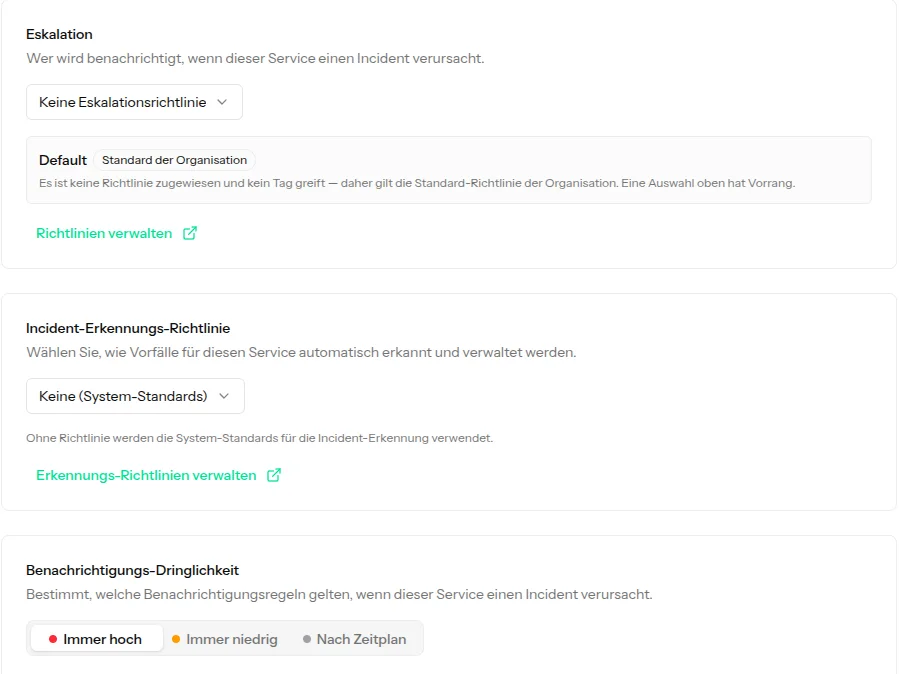
Part of a service’s settings: the “Escalation” field with no policy of its own and a note that the organisation default applies, below it the incident detection policy and the notification urgency with the options always high, always low and by schedule.
Per service: which policy escalates, and how urgent its alerts are.

What happens if nobody acknowledges?

Then the alert moves to the next step after the configured delay. After the last step the whole chain can start over up to ten times. Only an acknowledgement stops it.

Otherwise an empty schedule only shows up when it is too late. The schedule overview therefore flags a schedule when a gap is coming within the next 14 days. Removing the last participant from a schedule that a policy still uses needs an explicit confirmation.

Delay
0 to 1,440 minutes per step, so up to a day.
Repeat
Up to ten more rounds. If a handover happens in between, the repeat wakes the new person.
Gap
If a step reaches nobody because nobody is on duty in the schedule, the alert jumps to the next step immediately instead of waiting out the delay.
Nobody reached
If an alert reaches no human at all, the organisation owner and everyone who manages on-call get a message in the console and by email, even with “Do not disturb” on.
Expiring schedule
If a schedule has an end date and is still used in a policy, LIVCK warns 14 days ahead.

Acknowledging means “I’m on it”, not “fixed”. There is no second reminder if nothing happens for a long time after the acknowledgement.

How can I tell whether someone will actually wake up?

From the reachability light next to every name in the schedule. It rates the rules a person is alerted with while on call. Colleagues only see the colour and the reason, never phone numbers or rules.

Even a phone call does not always ring. If the phone is on silent or mutes unknown callers, it stays quiet. LIVCK therefore offers a contact card with the numbers alerts come from. Save it and allow the contact through “Do not disturb” in the phone’s settings.

The test alert shows whether that worked: a real call and a real SMS to your own verified number. It costs six credits, the same as an alert by call and SMS, and can be sent once every ten minutes.

If the on-call rules lack a phone call, LIVCK warns as soon as they are saved: nobody gets woken at night that way.

Green: “Wakes reliably”
A phone call to a verified number is part of the rules.
Yellow: “Wakes unreliably”
Only SMS, WhatsApp or Pushover. That does not wake people reliably.
Red: “No wake channel”
Only email, no verified contact method, or no rules at all.

Section 5 of the German Working Hours Act (Arbeitszeitgesetz, ArbZG) requires at least eleven hours of uninterrupted rest after the end of the daily working time. A call-out during on-call duty is working time and interrupts that rest. On the Business plan LIVCK warns in two places: in the schedule, when fewer than eleven hours separate two shifts of one person, and after an alert at night.

Both are notes. LIVCK does not change a schedule or keep anyone from working. It knows neither the daytime working hours nor how long a call-out took. Since the rest period only starts once the work is done, the time in the note is the earliest possible one, not the actual one.

How strict the limit is in a given case is not up to LIVCK. The law allows exceptions, for example through collective agreements (section 7(2) no. 1 ArbZG) and for hospitals and care facilities (section 5(3) ArbZG). Austria (section 12 AZG) and Switzerland (Art. 15a ArG) also set the daily rest at eleven hours and have their own rules for on-call duty and “Pikettdienst”.

On-call duty (Rufbereitschaft) differs from on-site standby (Bereitschaftsdienst) in where the person is. On standby they stay where the employer says, usually at work, and all of that time is working time. On call they choose where to be. According to a 2021 ruling of the European Court of Justice, on-call time can still count fully as working time if the constraints very significantly limit free time, for example a very short deadline to start work.

Schedule check
LIVCK looks through the planned shifts for two shifts of the same person with more than zero and fewer than eleven hours between them. Every hit is listed with name and hours on the schedule page, for the period shown, and in the monthly report. Shifts that follow on directly count as one duty period.
Note after a night alert
If a personal alert arrives between 10 p.m. and 6 a.m. in the person’s time zone, the person and everyone who manages on-call get a note in the console. It gives the time at which eleven hours since the alert will have passed. Once per incident and person, provided the organisation has an active on-call schedule.

This page is not legal advice. Whether a rota is permissible also depends on collective agreements, works agreements and employment contracts.

What is in the monthly on-call report?

Per schedule and month: how many shifts and hours each person had, how many alerts came through the schedule, and how many of them at night or at the weekend. Plus every place where fewer than eleven hours separated two shifts. On the Business plan LIVCK creates the report at the start of each month as a PDF and a CSV file.

The report is meant for whoever pays on-call allowances, and for the works council. People who manage on-call choose the recipients, up to ten addresses per schedule. Members of the organisation are enabled straight away. External addresses such as HR confirm once by email. A closed month can also be generated by hand and downloaded.

LIVCK keeps reports and shifts for 24 months, whatever the plan. Per-alert details follow the plan’s retention, 365 days on Business. After that the totals in the report remain.

The columns of the CSV file, one row per person. Below them come a totals row and the rest-period notes.
NamePerson in the schedule
ShiftsShifts that fall into the month
On-call (hrs)Hours on call, to one decimal place
AlarmsAlerts that reached the person through this schedule
of which nightlybetween 10 p.m. and 6 a.m. in the schedule’s time zone
of which weekendSaturdays and Sundays in the schedule’s time zone

Hours and the rest-period check are based on the planned shifts. A cover placed on top of a shift is counted there for the person originally scheduled. Alerts are counted for the person who was actually alerted.

How does the schedule get into my calendar?

As a calendar subscription, for example in Google Calendar, Apple Calendar or Outlook. Everyone subscribes to their own shifts across all schedules. People who manage on-call can also create a feed of the whole schedule with all names, for the team.

The feed shows the schedule as it actually applies, covers included, seven days back and 90 days ahead. Absences are not in it. The address is shown only once. Resetting it stops the old one immediately.

On top of that, LIVCK reminds each person 24 hours before their shift and again when it starts, in the console and by email. The reminder also says that “Do not disturb” and “Pause” do not apply to urgent alerts from the schedule during the shift. Whoever takes over sees at the start which of the schedule’s incidents are still open.

What does on-call with LIVCK cost?

On-call schedules start with the Team plan at €49 net per month. It includes two schedules, three people besides the owner and 25 credits for SMS and calls. There is no separate licence per responder: anyone in a rotation simply takes a regular seat in the team.

Only calls, SMS and WhatsApp use credits: 5 for a call, 1 for an SMS or WhatsApp message. Email, Pushover, Slack, Microsoft Teams, Discord, Telegram and webhooks cost nothing. The 25 credits of the Team plan therefore cover five calls. Monthly credits expire at the end of the billing period.

More credits come in packs: 100 for €12, 500 for €55 and 2,000 for €190 net. Purchased credits do not expire. If everything is used up, the alert goes to the person by email instead, and the owner gets a warning.

Extra seats cost €8 net per month each; extra on-call schedules cost €5 each, from the Team plan up.

Examples by rotation size, owner included. Prices net per month, plus 19 % German VAT.
up to 4Team€492 schedules, 25 credits
6Team and 2 extra seats€652 schedules, 25 credits
up to 11Business€11910 schedules, 50 credits, report, rest-period check
15Business and 4 extra seats€15110 schedules, 50 credits, report, rest-period check

Free and Solo have no on-call schedules. Escalation policies, the acknowledgement link and alerts by phone call still work there. Credits then come from purchased packs.

What LIVCK is not the right tool for

LIVCK plans on-call duty and wakes the right person. It is not an HR or time-tracking system. For these six jobs you need a different tool:

Calculating on-call pay

The report delivers shifts, hours and alerts. LIVCK does not calculate allowances, supplements or amounts in euros, and there is no interface to payroll software. The CSV file goes to whoever runs payroll.

Recording working time

LIVCK knows neither the daytime working hours nor how long a call-out took. The rest-period check works from planned shifts and the time of the alert. It warns but blocks nothing.

Acknowledging by keypress during the call

The call reads the incident out. Acknowledging happens through the link in SMS, email or Pushover, in the Pushover app, or in the console. There is no native app whose alerts bypass the phone’s silent mode.

Rotations with time windows

A rotation covers the clock around. “Only nights and weekends” cannot be set as a rule. For that there are manual schedules, where every shift is set individually.

Special rules in Austria and Switzerland

The check only knows the eleven-hour limit. LIVCK does not check the maximum of ten on-call days per month in Austria (section 20a AZG) or the maximum of seven Pikett days in four weeks in Switzerland (Art. 14 ArGV 1).

Rosters without IT alerts

LIVCK plans on-call so that the right person is woken when LIVCK raises an incident. For caretaking, care work or trades without such incidents, a rostering or HR tool is the better fit.

These points are listed here so nobody has to find them out in production.

How to set it up

From an empty account to the first scheduled shift takes five steps.

  1. Invite the team

    Everyone in the rotation needs a seat in the organisation. The Team plan includes three besides the owner, the Business plan ten.

  2. Verify phone numbers and add rules

    Each person verifies their number and creates on-call rules, for example a call right away and an SMS after five minutes. Without a call in those rules, LIVCK warns on saving.

  3. Create the schedule

    Set name, time zone, rotation and handover time, put the people in order and check the preview of the next four weeks.

  4. Add the schedule to escalation

    Out of the box the default policy alerts all members at once. For on-call, the schedule goes into the first step instead, followed by a delay and a backup. The policy applies as the default for all services or only to selected ones.

  5. Send a test alert

    With the test alert everyone checks that their phone rings at night. Then subscribe to the calendar.

Which plan limits matter here

Five limits matter for on-call. Everything else in a plan concerns monitoring.

LimitFree freeSolo €19 / monthTeam €49 / monthBusiness €119 / month
On-call schedules One rotation per schedule. More from Team up at €5 net per month each.——210
Team members besides the owner Everyone in a rotation takes a seat. More seats at €8 net per month each.——310
SMS and call credits per month A call costs 5, an SMS 1. Packs from 100 credits for €12 net.——2550
Report and rest-period check Monthly report as PDF and CSV, warning below 11 hours of rest.———included
Escalation and acknowledgement link Steps to people, teams and channels, also without a schedule.includedincludedincludedincluded

Prices are net, plus 19 % German VAT. LIVCK is a business-to-business offering.

All plans in detail

Frequently asked questions

What does on-call with LIVCK cost?
On-call schedules start on the Team plan at €49 net per month: two schedules, three people besides the owner and 25 credits for SMS and calls. The Business plan costs €119 and includes ten schedules, ten more people, 50 credits, the monthly report and the rest-period check. There is no licence per responder.
Does on-call duty count as working time?
As a rule, only the call-out itself. Time spent reachable but not working counts as rest. The European Court of Justice ruled in 2021 that on-call time can still be working time in full if the constraints very significantly limit free time. On-site standby, where the person stays where the employer says, counts in full. How on-call is paid is set by collective agreements, employment contracts or company agreements.
How much rest is required after a call-out at night?
Under section 5 ArbZG, at least eleven hours of uninterrupted rest after the end of the daily working time, and a call-out interrupts it. Collective agreements can allow different rules for on-call duty. On the Business plan LIVCK shows after an alert between 10 p.m. and 6 a.m. when the eleven hours end at the earliest, counted from the alert.
Can I use on-call scheduling on the Free or Solo plan?
Not the schedules; they start with the Team plan. Escalation policies with steps, the acknowledgement link and alerts by call, SMS or email work on every plan. Credits for calls and SMS come from purchased packs there, because Free and Solo include no monthly credits.
How do I acknowledge an alert at night without a laptop?
Through the link in the SMS, email or Pushover message. It opens a page with the incident; one tap on the button acknowledges, no login needed. The link is valid for four hours. A link scanner that opens it in advance does not acknowledge anything. Pushover users can also acknowledge directly in the app.
Does the alert call ring when the phone is on silent?
Not by itself. An alert call is an ordinary phone call, and a silent phone stays silent. LIVCK provides a contact card with the caller numbers: save it and allow the contact through “Do not disturb”. The test alert shows whether the phone then rings.
Can the team see why someone is absent?
No. Within the organisation, only the person themselves and those who manage on-call see the reason. Everyone else sees “absent” and the period. Absences never appear in the calendar feed, and notifications give no reason.
Can on-call be managed through an API?
Yes, from the Team plan. The REST API reads and writes schedules, covers, absences and cover requests, creates shifts in manual schedules and answers who was on call during a given period.
Where is the data processed?
The application runs on servers in Germany. SMS and calls go through seven.io in Kiel and LOX24 in Berlin. WhatsApp and Pushover are services outside Germany and are only used if a person adds them as a contact method themselves.

Monitoring and on-call in one account

The account is free and needs no credit card. On-call schedules start with the Team plan at €49 net per month, cancellable each month on monthly billing.

Everything on this page reflects the feature set of LIVCK Cloud as of 28 October 2026. Plan limits can change — the pricing page is authoritative.